Put music, announcements, and (optionally) a voice assistant in every room — controlled by Home Assistant, streamed by Music Assistant, and kept in perfect sync by the open Sendspin protocol. You bring the speakers; a small ESP32 audio device does the rest.
- Your music, everywhere: Spotify, Tidal, Qobuz, internet radio, or your own library, through Music Assistant
- True multi-room: group any rooms and they play in sync, with album art and track info
- Cast from your phone: every room — and every group of rooms — shows up as a Spotify Connect and AirPlay target, thanks to Music Assistant
- Smart home announcements: doorbell, timers, reminders — music ducks and comes back
- Local and open: no cloud account, no app lock-in, firmware that updates itself
- Affordable: from $15–25 per room, reusing the speakers you already have
How it fits together
1. Your music
Streaming services, radio, a NAS full of FLACs — Music Assistant connects them all.
2. Home Assistant
Music Assistant runs inside it and is where you browse, play, and group rooms. Automations trigger announcements.
3. Sendspin over Wi-Fi
Music Assistant streams audio, artwork, and metadata to every room, time-synced.
4. A device per room
A Sonocotta board running ESPHome plays it through your speakers or amplifier.
Why Sendspin? It is the new open multi-room protocol from the Music Assistant team. Unlike AirPlay, it is fully open; unlike Snapcast, it carries artwork, metadata, and controls; and it is natively supported by ESPHome, so the device is a first-class citizen in Home Assistant. It is young and improving quickly — and because the factory firmware updates itself, you get those improvements automatically.
Pick your device
Only one question really matters: what will the device plug into? Then choose between a bare board (lowest price, fits a standard Raspberry Pi case or goes inside your speaker) and an Esparagus device (finished aluminium case, screen, volume knob, ready for the shelf).
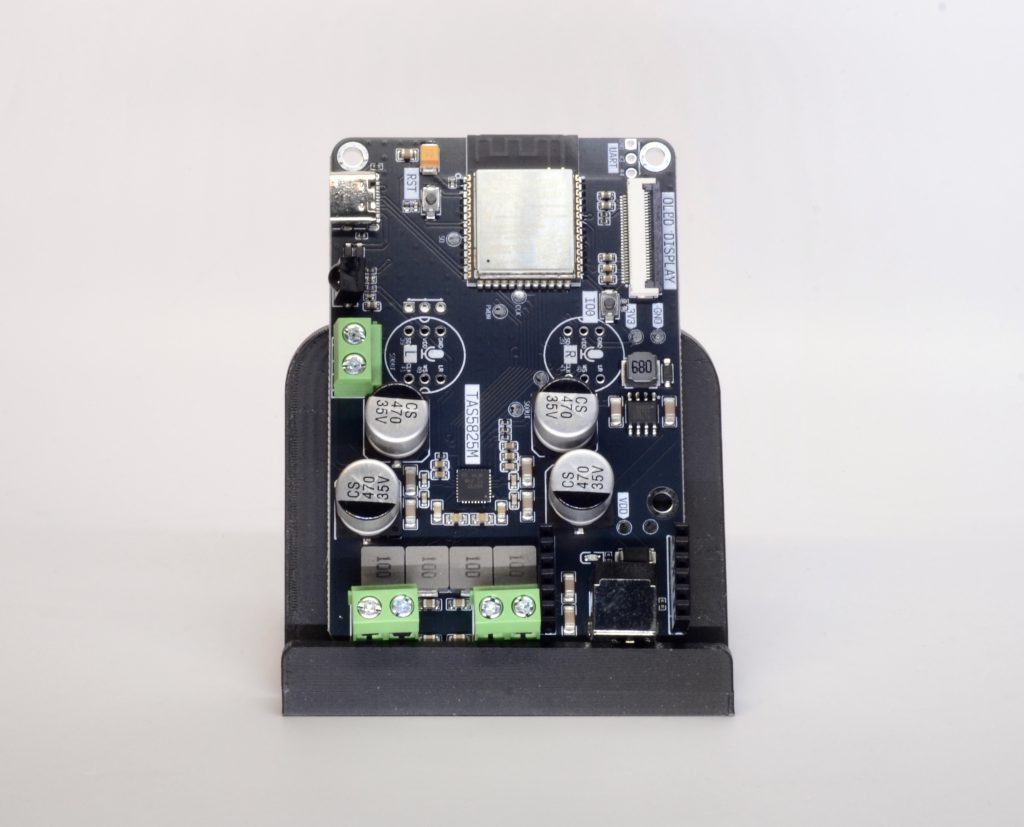
Full-size passive speakers
Bookshelf or floor-standing speakers with bare speaker-wire terminals — including that old hi-fi pair. The Louder series brings real power plus on-device sound tuning: an equaliser built into the amplifier chip, to tame a boomy room or bring tired speakers back to life.
- Board: Louder-ESP32-S3 — 2×32 W with sound tuning (Plus: 2×45 W)
- Heavy duty: Louder-ESP32-Pro — 2×45 W with sound tuning, colour screen, microphone and Ethernet built in
- Esparagus: Louder Esparagus — 2×45 W with sound tuning and a screen, in an aluminium case (the S3-based Louder Esparagus Plus is coming soon)
Smaller speakers: kitchen, desk, bathroom
Compact passive speakers where a few watts is plenty. The Loud series keeps it simple — no tuning to fiddle with, and it runs from any USB-C phone charger.
- Board: Loud-ESP32-S3 — 2×5 W, the simplest and cheapest way in
- With voice: Esparagus Echo Duo — 2×5 W stereo with dual microphones, so it doubles as a local voice assistant (beta)

Inside the speaker itself
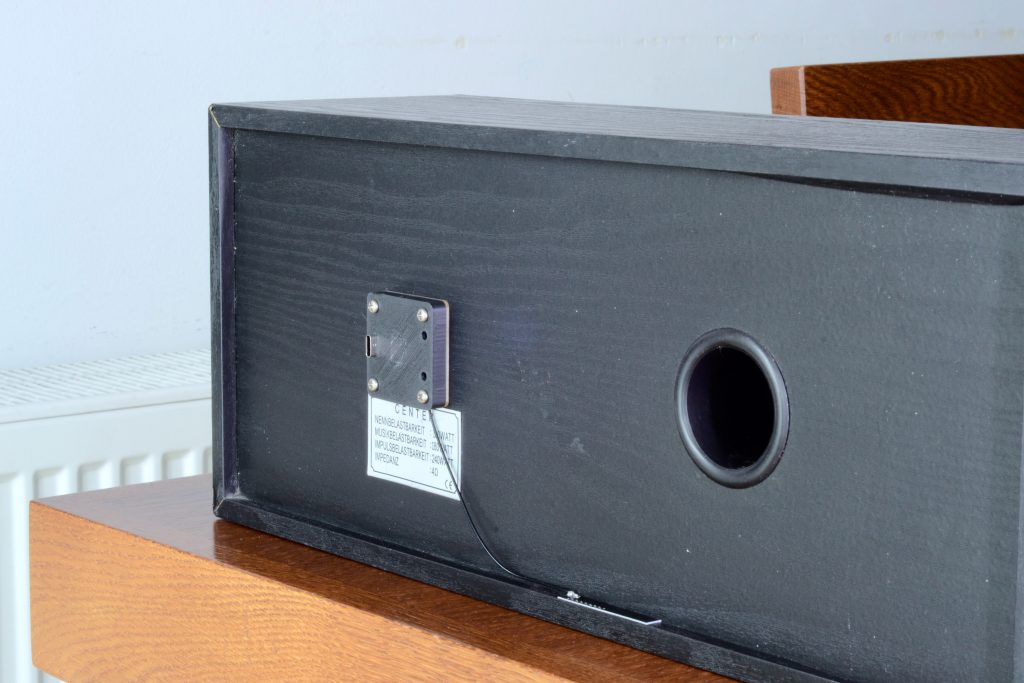
No box on the shelf at all: the board replaces the terminal plate on the back of the speaker, and the speaker becomes a smart speaker. Only a screwdriver is needed.
- Board: Louder-ESP32-Mini — one per speaker (mono), with the same sound tuning as the Louder series
- 42 mm for small speakers, powered by a phone charger; 55 mm for larger ones, powered by a USB-PD charger (up to 65 W supported, 45 W recommended for the board’s small size)
An amplifier, receiver, or powered speakers
Anything with an AUX/line input: a stereo amp, AV receiver, active monitors, a soundbar. The device becomes its network source, and your amplifier does the rest.
- Board: HiFi-ESP32-S3 — clean PCM5100 line output, powered from USB-C (Plus adds a basic EQ)
- Esparagus: HiFi Esparagus S3 — the same in an aluminium case, plus a microphone for voice control (beta)
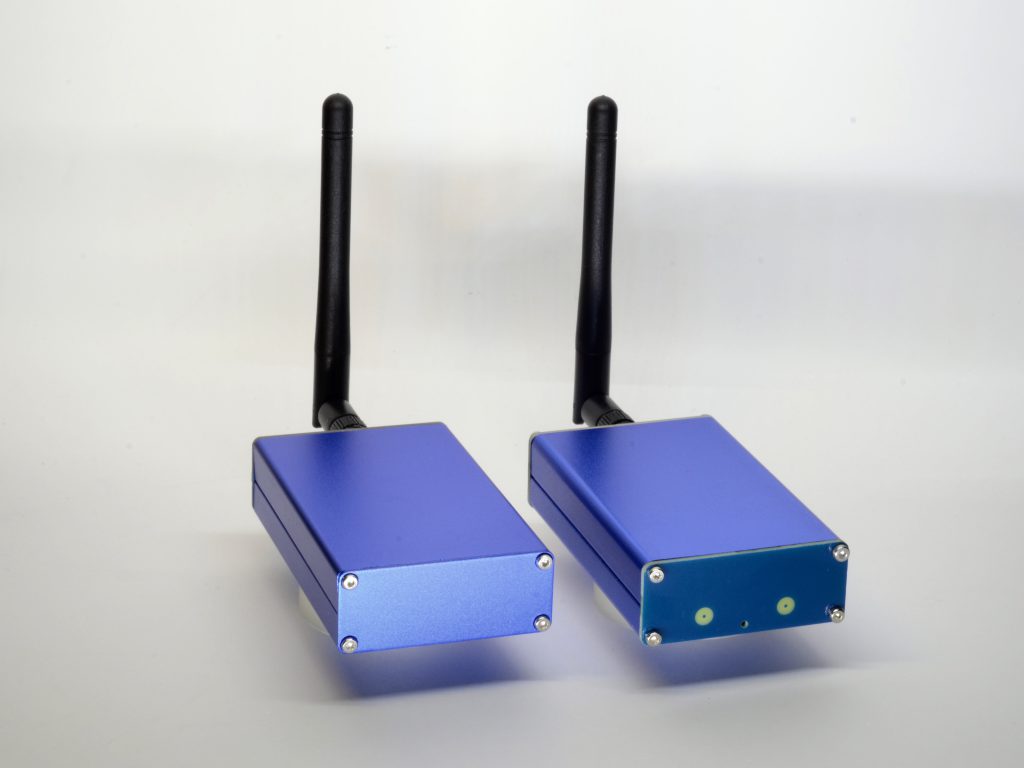
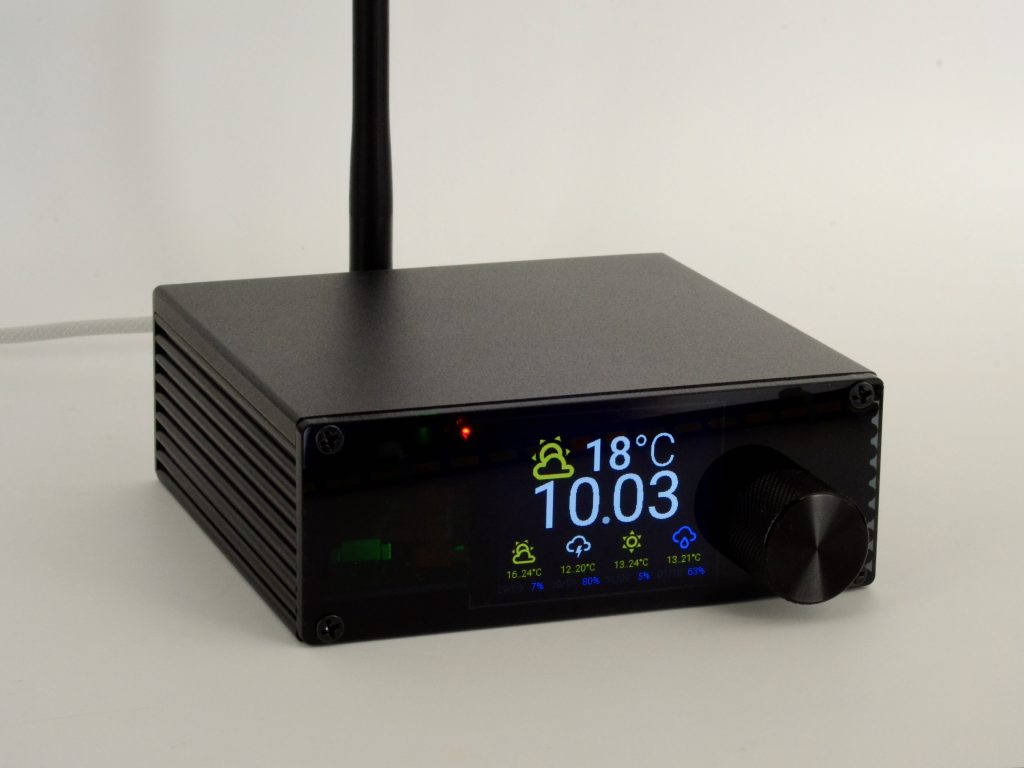
Speakers today, an amplifier tomorrow — or both
The Amped series bridges the two cases above. Its built-in amplifier drives passive speakers directly, while a line output can feed an external amp, an active subwoofer, or headphones instead. Pick it if your setup is likely to change, or you are not sure yet.
- Board: Amped-ESP32-S3 — 2×40 W speaker outputs plus a 3.5 mm line out (plugging into the jack mutes the speakers); Plus adds a basic EQ
- Esparagus: Amped Esparagus Plus — 2×40 W with line-out and line-in, colour screen, volume knob and microphone, in an aluminium case
Side by side
| Device | Plugs into | Output | Sound tuning (DSP) | Power from | Mic | Screen | Price |
|---|---|---|---|---|---|---|---|
| Louder-ESP32-S3 | full-size passive speakers | 2×32 W | ✅ | 5–28 V adapter | optional | optional OLED | $24 |
| Louder Esparagus S3 | full-size passive speakers | 2×45 W | ✅ | USB-PD or 5–28 V | — | optional color TFT | $79 |
| Louder-ESP32-Pro | full-size passive speakers | 2×45 W | ✅ | USB-PD (65 W) | ✅ | optional color TFT | $45 |
| Loud-ESP32-S3 | small passive speakers | 2×5 W | — | USB-C 5 V | optional | optional OLED | $20 |
| Loud Esparagus | small passive speakers | 2×5 W | — | USB-C 5 V | — | — | $45 |
| Esparagus Echo Duo | small passive speakers | 2×5 W | — | USB-C 5 V | ✅ | — | $45 |
| Louder-ESP32-Mini | inside one speaker | 1×3.5 W / 1×45 W | ✅ | USB-C / USB-PD | — | — | $15 |
| HiFi-ESP32-S3 | amp / powered speakers | line out | Plus: basic EQ | USB-C 5 V | optional | optional OLED | $20 |
| HiFi Esparagus S3 | amp / powered speakers | line out | — | USB-C 5 V | ✅ | — | $45 |
| Amped-ESP32-S3 | speakers and/or amp | 2×40 W + line out | Plus: basic EQ | 5–28 V adapter | optional | optional OLED | $25 |
| Amped Esparagus Plus | speakers and/or amp | 2×40 W + line in/out | basic EQ | USB-PD or 9–28 V | ✅ | optional color TFT | $79 |
Why the “S3” version?
Most boards are sold with either the classic ESP32 or the newer ESP32-S3 chip. For Home Assistant and Sendspin, order the ESP32-S3. Its extra memory and speed give smoother playback, and it is required for the voice assistant. Sendspin does run on the classic ESP32 too, so a board you already own will work — the S3 simply has more headroom. The only thing the S3 lacks is Bluetooth audio, which this setup doesn’t use. Louder-ESP32-Mini and Louder-ESP32-Pro are S3-only, so there is nothing to choose there.
Installing into a rack, a DIN rail or a ceiling-speaker system? That is a job for the Esparagus Audio Brick, designed for professional installs.
What else you need
- Home Assistant with the free Music Assistant add-on, and Wi-Fi in the rooms you want to cover.
- A power supply — see the next section; it is the one thing people most often get wrong.
- Speaker wire for passive speakers, or a 3.5 mm-to-RCA cable for an amplifier.
- For first setup only: a computer with Chrome or Edge and a USB-C data cable.
- Optional: a Raspberry Pi 4 case for the bare boards (they share the same footprint), or a Raspberry Pi 5 aluminium case for the Louder-ESP32-Pro.
Choosing a power supply
| Device | Use |
|---|---|
| HiFi-ESP32, HiFi Esparagus, Loud-ESP32, Loud Esparagus, Esparagus Echo, Louder-ESP32-Mini 42 mm | Any USB-C phone charger (5 V) |
| Louder-ESP32-Pro, Louder Esparagus, Amped Esparagus | A USB-C PD charger — a 65 W laptop charger gives full power; a 25–45 W phone fast-charger is fine for a small room |
| Louder-ESP32-Mini 55 mm | A USB-C PD charger — 45 W recommended (up to 65 W supported) |
| Louder-ESP32, Amped-ESP32 | A laptop-style adapter with a 5.5/2.5 mm barrel plug, 12–20 V, sized to your speakers (below) |
Rule of thumb for the barrel-jack boards: the clean power of most home speakers is around 10 W, whatever the label says. A pair of 10 W, 8 Ω speakers is happy with a 12 V, 3 A adapter; go to 19–20 V, 3+ A only for large, efficient speakers. Don’t pick a far higher voltage than your speakers need — it adds cost and risks the speakers. For the USB-PD devices, avoid Apple chargers (they don’t negotiate power with these boards); most other phone and laptop chargers work fine. The full calculation is in the hardware documentation.
Set it up
About fifteen minutes per room, no code and no command line.
0. Get yourself Home Assistant
The following guide assumes that you already have Home Assistant, usually hosted on a Raspberry Pi, small fan-less PC, or HA Yellow. Why would you need one? Wall switches don’t need WiFi, right?
Home Assistant is much more than remote control. Automations of all sorts, hooking up audio to visual effects; hooking up smart devices from any brand painlessly using hundreds of built-in integrations; managing your Audio library, and allowing whole-household orchestration with an easy-to-use mobile app – give it a try; it’s worth it!
1. Install Music Assistant
In Home Assistant, install the Music Assistant add-on and its integration, then add your music providers (Spotify, Tidal, radio, a local library…). The Music Assistant guide walks you through it. You only do this once for the whole house.
2. Connect speakers and power
- Passive speakers: run speaker wire from the board’s screw terminals to each speaker — left to L, right to R, and keep + and − the same way round on both speakers.
- Amplifier / powered speakers: connect the 3.5 mm line output to the AUX or line input. On Amped devices, plugging into the 3.5 mm jack mutes the speaker outputs.
- Louder-ESP32-Mini: unscrew the speaker’s terminal plate, connect the driver wires to the board, and screw the board in place.
Connect the power supply last.
3. Install the Sendspin firmware from your browser
Plug the device into your computer over USB, open the web installer for your device family, find your board and click Install ESPHome (Sendspin). Choose the “screen” build only if a display is fitted. Wi-Fi is set up on the same page right after flashing — no files to edit.

4. Add it to Home Assistant
Within a minute, Home Assistant shows a newly discovered ESPHome device under Settings → Devices & services. Click Add, give it a room name, and it appears as a media player — and as a Sendspin player in Music Assistant.

5. Play, group, automate
Start something from Music Assistant — or straight from the Spotify or Apple Music app on your phone — then group rooms to play in sync.

For announcements, any Home Assistant automation can send speech to the device; music ducks under it and resumes afterwards:
action: tts.speak
target:
  entity_id: tts.piper
data:
  media_player_entity_id: media_player.kitchen_speaker
  message: "Someone is at the front door"
Updates take care of themselves: the device checks for new firmware every few hours and installs it. If you’d rather control updates or customise the device, adopt it in the ESPHome Builder and build from the published configs on your own schedule. Something wrong? Run the web installer again to get back to the factory image.
Sound tuning on Louder devices
Every Louder device — Louder-ESP32, Louder Esparagus, Louder-ESP32-Pro and the Mini — has a signal processor (DSP) built into its amplifier chip. With the Sendspin firmware it shows up in Home Assistant as ordinary controls on the device page, so you can tune from the app, or even from an automation (less bass after 10 pm, anyone?).
- 15-band equaliser: ±15 dB per band, from the deepest bass to the top treble — tame a boomy room or bring small speakers to life. Use one equaliser for both speakers, or a separate one for each when they differ
- Stereo, mono, left or right: a single speaker in the bathroom gets both channels; two speakers in different corners can each take one side
- Subwoofer presets: ready-made steep (4th-order) low-pass and high-pass filters between 60 and 150 Hz, to split the sound between a subwoofer and the main speakers
- Power and volume limits: cap the amplifier’s output to protect small speakers, and set the volume range to match the other speakers in your house
- Bridged mode: combine both channels into one stronger mono output for a single bigger speaker
- Health reports: overheating or a shorted speaker wire shows up in Home Assistant and can be cleared without a restart


The HiFi and Amped Plus models offer a basic EQ. Want to go all the way — a fully parametric equaliser, a crossover builder, and correction fitted to a room measurement? The AirPlay firmware opens up the same chip in full.
Going further
- Voice assistant (beta): every S3 board has a published config that runs local wake-word detection and Home Assistant Assist alongside Sendspin — an Alexa-style speaker without the cloud. Esparagus Echo, HiFi Esparagus S3, Amped Esparagus Plus and Louder-ESP32-Pro have the microphone built in; the bare ESP32 boards take an optional add-on mic. These configs work but are still being polished. Voice assistant guide · Voice + Sendspin configs
- Now-playing screen: colour-screen devices show album art, progress and volume. More
- Sound tuning: shape the sound to your speakers and your room with the equaliser built into Louder devices. How it works
- Wired Ethernet: boards with Ethernet have a dedicated wired build. It is still experimental and, for now, Wi-Fi is the more stable choice. Details

Questions people ask
Do I need Home Assistant for this?
For this setup, yes — Home Assistant and Music Assistant are the brains. If you just want to cast from your phone without a smart home, the same hardware runs standalone AirPlay 2 firmware or Squeezelite (Spotify Connect, AirPlay and Bluetooth) instead.
Can I still use Spotify Connect or AirPlay from my phone?
Yes. Music Assistant’s Spotify Connect and AirPlay plugins expose each device — and each group of rooms — as a player in the Spotify app and in Apple’s AirPlay menu. Pick “Living room + Kitchen” on your phone and both play in sync.
Can I mix different devices in one house?
Yes. Every board on this page runs the same firmware family, so a Louder-ESP32 in the living room, a HiFi Esparagus on the amp and a Mini in the kitchen speaker all group together in Music Assistant.
I already have a classic ESP32 board. Will it work?
Yes — every current Sonocotta board, classic ESP32 or S3, has a Sendspin image in the web installer. Recent ESPHome releases made the classic ESP32 more stable; the S3 is still the smoother of the two and is required for voice.
The device doesn’t show up in Home Assistant.
Check that it is on the same network (and VLAN) as Home Assistant, since discovery uses mDNS. You can also add it by hand: Settings → Devices & services → Add integration → ESPHome and enter its IP address.
Where can I buy?
EU stock ships from Tindie and Lectronz; worldwide shipping from Elecrow. Each device page links straight to its listings.
Stuck? Ask
Come say hi on Discord, open an issue on GitHub, or email me — I read every message.